How to make a Spotify playlist cover
A good playlist cover is square, readable at thumbnail size and small enough to upload. This page crops your photo to a square, adds a title if you want one, and saves a 640×640 JPEG that fits Spotify’s API limit.
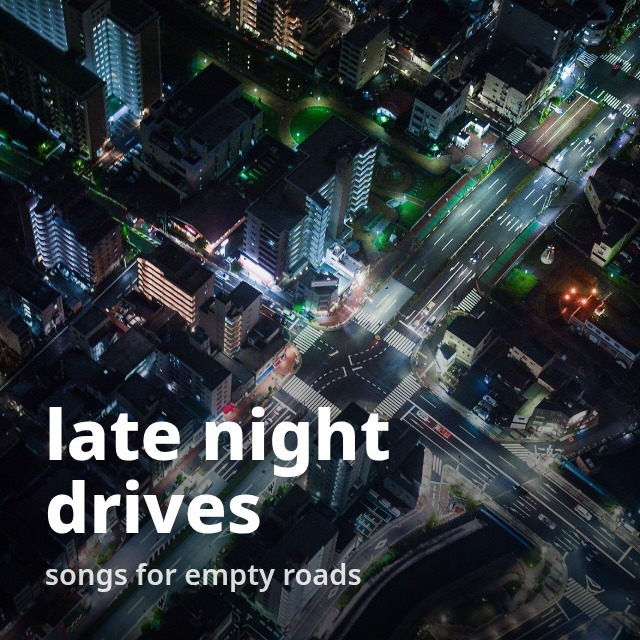
- Drop a photo. A sample cover is already made from a CC0 night-city photo, so you can see the result first.
- Zoom and slide the crop until the square shows what you want; add a title and a small line, or leave them empty.
- Pick a look (title band, text only or CD case) and a size: 640×640 by default, or 300 or 1000. The status shows the JPEG bytes and the base64 characters against Spotify’s 256 KB API limit.
- Download the JPEG and set it in Spotify: on a phone, Edit → Change cover image; on a computer, click the cover of a playlist you created. Or copy the base64 for the Web API.
What Spotify says about playlist covers (read October 24, 2026)
| What | What Spotify says | Source |
|---|---|---|
| API upload: format and size | Body image/jpeg: “Base64 encoded JPEG image data, maximum payload size is 256 KB.” | Spotify Web API reference, “Add Custom Playlist Cover Image” |
| API upload: what it does | “Replace the image used to represent a specific playlist.” Scopes: ugc-image-upload, playlist-modify-public, playlist-modify-private. Endpoint PUT /playlists/{playlist_id}/images. | Spotify Web API reference, “Add Custom Playlist Cover Image” |
| The image scope | ugc-image-upload: “Write access to user-provided images.” | Spotify Web API docs, “Scopes” |
| Sizes Spotify serves | “Three mosaic images of size 640×640, 300×300, and 60×60, if the playlist contains tracks from 4 or more albums” · “An album cover of size 640×640, if the playlist contains 1 to 3 tracks or has tracks from less than 4 different albums” | Spotify Web API docs, “Playlists” (Using Playlist Images) |
| Default cover | “In most cases there will be one image in a variety of sizes and the image will be a mosaic created from the album covers for the first few tracks” | Spotify Web API docs, “Playlists” (Using Playlist Images) |
| Image list | “The array may be empty or contain up to three images. The images are returned by size in descending order.” The “Get Playlist Cover Image” example returns one image, "height": 300, "width": 300. | “Get Playlist”; “Get Playlist Cover Image” |
| In the app, phone | “At the top of the playlist, tap Edit.” → “Select Change cover image.” → “Choose an image then tap Save.” | Spotify Support, “Customize your playlist cover” |
| In the app, computer | “Click the image on a playlist you created.” → “Choose a photo, then click SAVE.” | Spotify Support, “Customize your playlist cover” |
| Spotify’s own cover maker | “Select Create cover art.” You can “Add text to the cover art.” and “Add stickers.” It is listed “For: Free and Premium on mobile and tablet”. | Spotify Support, “Customize your playlist cover” |
| Rules | “Make sure your picture doesn’t violate any copyright, trademark, or personal image rights.” · “However, content that violates the Spotify Platform Rules will be removed.” | Spotify Support, “Customize your playlist cover”; Spotify Support, “Profile and playlist user image guidelines” |
All read in a browser on October 24, 2026. Gridloom is not affiliated with Spotify.
So what size should a Spotify playlist cover be?
Spotify doesn’t say for uploads in the app. Neither help article gives a pixel size, an aspect ratio or a file size. The numbers that do exist are in the developer docs: the API takes a JPEG whose base64 text is at most 256 KB, and the playlist images Spotify hands back come in 640×640, 300×300 and 60×60. All of them are square.
That is why this page makes a square JPEG at 640×640 by default: it matches the largest size Spotify documents, and it is small enough for the API. 300×300 (the size in the “Get Playlist Cover Image” example) and 1000×1000 are one click away. If you upload a photo that isn’t square, you don’t control how it gets fitted into those square sizes. Cropping it yourself, with the zoom and position sliders, means you pick what stays.
The 256 KB limit, in bytes
The limit applies to the base64 text, not the JPEG file. Base64 turns every 3 bytes into 4 characters, so a JPEG of 166,169 bytes becomes 221,560 characters. To stay under 256 KB of base64 the JPEG has to be at most 192,000 bytes if a KB is 1,000 bytes, or 196,608 bytes if it is 1,024. Spotify’s reference doesn’t say which, so this tool aims for the smaller one: base64 of at most 256,000 characters, which passes either way. With the box ticked it lowers JPEG quality step by step (92, 88, 84…) until the cover fits, and the status line shows the exact byte and character counts.
Measured on the sample photo
| Setting | JPEG | Base64 | Quality |
|---|---|---|---|
| 640×640, title band (the cover above) | 166,169 bytes | 221,560 chars | 92 |
| 300×300, title band | 43,333 bytes | 57,780 chars | 92 |
| 1000×1000, title band, limit on | 187,716 bytes | 250,288 chars | 75 |
| 640×640, CD case | 107,829 bytes | 143,772 chars | 92 |
Sample: “Neon streets” by JINDONG H (Unsplash), CC0, via Wikimedia Commons, resized to 1600×1068. Measured in Chrome with this page’s own code; a busier photo needs a lower quality to fit.
Cover too large, or it won’t upload?
Spotify’s help pages we read don’t list an upload limit or explain upload errors, so we can’t tell you what the app’s cutoff is. What we can say: a 640×640 JPEG under 192,000 bytes is the file Spotify’s own API is built to accept, so it’s the safest one to try. A photo of several megabytes is many times that size. If the upload still fails, try the other device: on a computer Spotify’s steps are to click the cover of “a playlist you created”.
Why can’t I change my Spotify playlist cover?
The computer steps only cover playlists you made (“Click the image on a playlist you created.”), and the phone steps start from the playlist’s Edit button. We found nothing in Spotify’s help about changing the cover of a playlist made by Spotify or by someone else. The article names the phone menu item two ways, “Change playlist cover” in the Create cover art steps and “Change cover image” in the upload steps, so look for either. Images that break the rules get removed: Spotify’s guidelines say “Basically, don’t post an image of someone without their consent.” If you only want to stop seeing covers, the same help article says: “Use the compact library layout to hide cover images from Your Library.”
CD covers, text and GIFs
The CD case look puts your photo in a jewel case with a hinge strip and a glossy front, on a background taken from the photo’s own colours. It’s a style, drawn in the browser; it doesn’t use any album art. For a cover with text, type a title and a small line; the shaded band keeps white text readable on bright photos. Spotify’s own Create cover art (phone and tablet) can also add text and stickers, if you’d rather do it in the app.
GIF and PNG: the API takes image/jpeg only, and the help articles don’t mention GIF, PNG or animated covers at all, so we can’t say whether the app keeps an animation. This tool always saves a still JPEG; a GIF becomes its first frame.
Uploading with the Web API
Click “Copy base64 (for the API)” and send it as the request body, with a token that has the scopes Spotify lists for this endpoint (ugc-image-upload, playlist-modify-public, playlist-modify-private):
curl -X PUT "https://api.spotify.com/v1/playlists/YOUR_PLAYLIST_ID/images" \
  -H "Authorization: Bearer YOUR_TOKEN" \
  -H "Content-Type: image/jpeg" \
  --data "$(cat cover.b64)"
Spotify’s reference lists a 202 response with an empty body. Image URLs returned later by “Get Playlist” are temporary: the docs say the URL “is temporary and will expire in less than a day.”
What this tool doesn’t do
It doesn’t upload to Spotify or log in to your account; you save the JPEG and add it in the app (or send the base64 yourself). It doesn’t generate images with AI; it crops and lays out a photo you choose. It makes still JPEGs only. Covers over 1000×1000 (2000 and 3000 px) are Pro, and Spotify doesn’t document any need for them: they’re for printing or other services. For a YouTube thumbnail use the YouTube thumbnail resizer; for a round profile photo, the LinkedIn profile picture resizer.
Frequently asked questions
What size is a Spotify playlist cover?
Spotify’s help pages don’t give one. Its Web API docs show playlist images at 640×640, 300×300 and 60×60, all square, so this tool makes a square 640×640 JPEG by default (300×300 and 1000×1000 are also free). Read on Spotify for Developers, October 24, 2026.
What is the Spotify playlist cover size limit?
For the Web API: “Base64 encoded JPEG image data, maximum payload size is 256 KB.” That means a JPEG of at most about 192,000 bytes. For uploads in the app, Spotify’s help articles don’t state a limit. This tool keeps the base64 at or under 256,000 characters and shows the count.
Why is my Spotify playlist cover too large or not uploading?
Spotify’s help pages don’t explain upload errors or give an app limit, so we can’t say exactly. A 640×640 JPEG under 192,000 bytes is what Spotify’s own API accepts, which makes it the safest file to try instead of a multi-megabyte phone photo.
Does a Spotify playlist cover have to be square?
Spotify doesn’t say so in words, but every size in its API docs is square (640×640, 300×300, 60×60) so crop to a square yourself and you choose what is cut off.
What does 300x300 mean for Spotify covers?
300×300 is one of the playlist image sizes Spotify’s API returns, and it is the size in the example response of “Get Playlist Cover Image”. It is the middle size; 640×640 is the largest Spotify documents.
How do I change my Spotify playlist cover on my phone?
Spotify’s steps: go to Your Library, open the playlist, “At the top of the playlist, tap Edit.”, “Select Change cover image.”, then “Choose an image then tap Save.” Save the JPEG from this page to your photos first.
How do I change a Spotify playlist cover on a computer?
Go to Your Library, “Click the image on a playlist you created.”, then “Choose a photo, then click SAVE.” This works in the desktop app and the web player, per Spotify’s help article.
Why can’t I change my Spotify playlist cover?
Spotify’s computer steps are for “a playlist you created”, and its help doesn’t describe changing the cover of a playlist made by Spotify or another user. Images that break Spotify’s rules (copyright, trademark, a person’s image without consent) can be removed.
Can a Spotify playlist cover be a GIF or a PNG?
The Web API accepts JPEG only, and Spotify’s help articles don’t mention GIF, PNG or animated covers. This tool always saves a still JPEG; a GIF becomes its first frame.
How do I make a Spotify playlist cover with text?
Type a title (and an optional small line) in the Text box, choose its position, colour and font, and keep “shaded title band” on if the photo is bright. Spotify’s own Create cover art on phones and tablets can also add text and stickers.
How do I upload a playlist cover with the Spotify API?
PUT the base64 of a JPEG to /v1/playlists/{playlist_id}/images with Content-Type image/jpeg and a token with the scopes Spotify lists for it: ugc-image-upload, playlist-modify-public and playlist-modify-private. The base64 must be at most 256 KB. “Copy base64” on this page gives you a body that fits.
Is it free, and is my photo uploaded?
Free for one cover at a time at 300, 640 or 1000 px, with no watermark and no signup. Everything runs in your browser; the photo isn’t uploaded anywhere. Pro ($5 for 30 days, paid in USDC) adds 2000 and 3000 px covers and a ZIP of covers from several photos at once.