How to add a film look to a photo
Film looks come from a few physical effects working together: the stock's tone and color response, grain that is strongest in the midtones, light scattering around highlights, and the lens and handling. This tool simulates each one separately so you can dial in exactly as much as you want.
- Open or drop a photo. A sample scene loads automatically so you can try it right away.
- Pick a film stock preset: Neutral (grain only), Portrait 400, Vivid 100, Gold 200, Consumer 400, Tungsten 800, Tri-X-style or soft B&W, Expired, or Disposable.
- Tune grain amount and size, halation, bloom, vignette, chromatic fringe and light leaks.
- Optionally add dust, scratches and an orange date stamp, then hold Compare to check against the original.
- Download a PNG or JPEG. Free exports are up to 1000px; Pro exports at full resolution.
What each effect does
Film stock sets per-channel tone curves, saturation and split-toning for shadows and highlights. Grain is two octaves of seeded noise, strongest in the midtones and weaker in deep shadows and highlights, as on real negatives. Color grain adds slight per-channel variation like dye clouds. Halation adds a red-orange halo around bright areas, and Bloom adds a soft white glow. Chromatic fringe shifts red and blue outward from the center like lateral lens aberration. Light leak screens warm orange and red glows in from an edge, a corner or a streak. Dust & scratches draws specks, hairs and vertical scratches like a dusty scan.
Frequently asked questions
Is this film filter free?
Yes. Every preset and effect is free, with exports up to 1000px on the long side. Pro unlocks full-resolution exports up to 8000px.
Are these real Kodak, Ilford or CineStill film profiles?
No. The presets are hand-tuned approximations of each stock's general character (Portra-style warm, soft skin; Ektar-style saturation; Tri-X-style contrasty black and white; CineStill-style tungsten balance and red halation). They are not scanned LUTs or official profiles, and Gridloom is not affiliated with Kodak, Ilford, Fujifilm or CineStill.
What is halation?
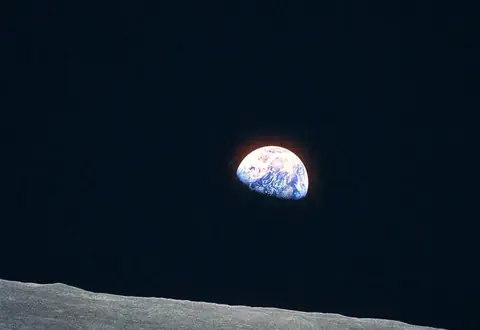
Halation is the reddish glow around bright highlights on film. Light passes through the emulsion, reflects off the film base and re-exposes the red-sensitive layer. CineStill 800T is famous for it because its anti-halation layer is removed. The Halation slider adds a tight red-orange halo to highlights, and Bloom adds a wider, softer glow.
Does the grain look the same at full resolution?
Grain, halation, leaks and dust are sized relative to the frame, so the export looks like the preview, just sharper. Grain is generated from a fixed seed, and Shuffle picks a new one.
Are my photos uploaded?
No. Everything runs in your browser, in a background worker on your device. Exports are new PNG or JPEG files and do not keep the original photo's EXIF metadata.
Can I add an orange date stamp like an old point-and-shoot?
Yes. Turn on Date stamp and type any date using digits, spaces, apostrophes, dashes, dots and colons. It renders as glowing orange seven-segment digits in the bottom-right corner, with grain on top as it would be on film.
Can I add grain without changing the colors?
Yes. Choose the Neutral (grain only) preset. It leaves tone and color untouched, so you can add only grain, or any other effect you switch on.