How to resize an image for a Bluesky banner
A Bluesky banner is a 3:1 image with your avatar on its lower-left corner. bsky.app never shows all of it: the box is always 150 px tall, so the top and bottom go on desktop and the sides go on phones. This page crops your image to 3:1, keeps the JPG under Bluesky’s 1,000,000-byte limit, optionally adds a headline in the area every screen shows, and previews it the way bsky.app draws it.
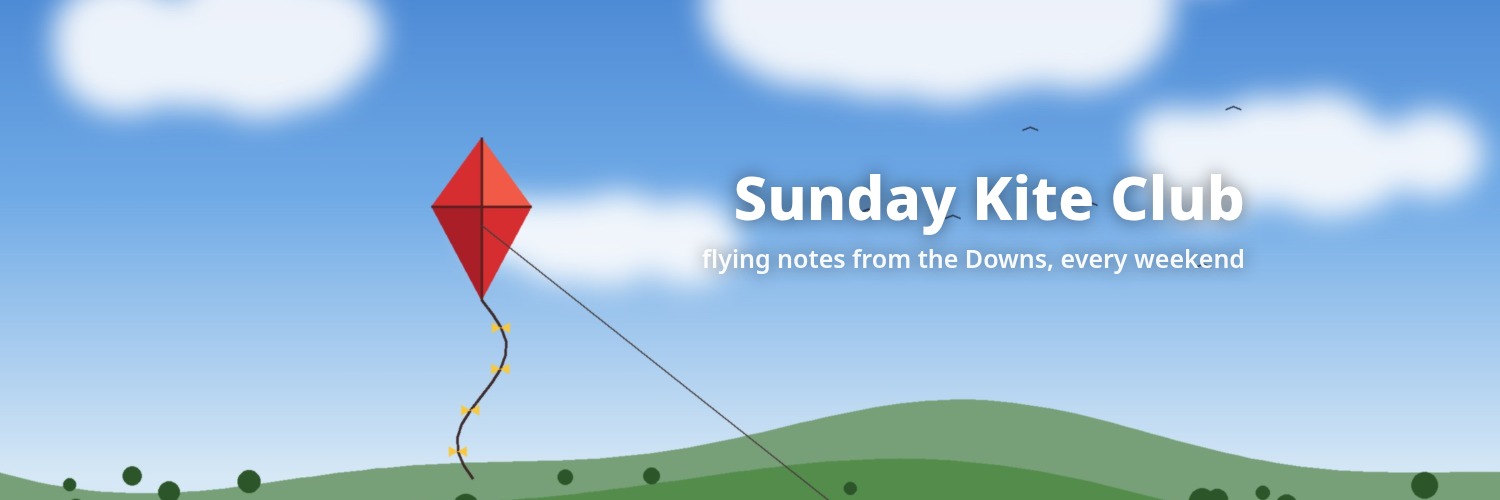
- Drop an image. A sample banner is already made from an original 2400×1600 illustration, so you can see the result first.
- Crop: zoom and slide until the 3:1 strip shows what you want, or fit the whole image with blurred sides. Type a headline if you want one.
- Check the Desktop, Tablet and Phone previews. Keep text out of the shaded edges and the green avatar corner.
- Download the 1500×500 JPG (under 1,000,000 bytes), then in Bluesky: Edit Profile, tap the banner, upload it, keep the crop, Save.
What Bluesky’s own files say (read October 24, 2026)
Bluesky has no help page that gives a banner size. What it does publish is the profile record format and the open-source code of its app, so the table quotes those directly. Code links point to the current files; we read them at social-app commit 4e4ad9c and bsky commit 293d649.
| What | What it says | Source |
|---|---|---|
| What the banner is | “Larger horizontal image to display behind profile view.” | Bluesky lexicon app.bsky.actor.profile |
| Formats and file limit | "accept": ["image/png", "image/jpeg"] and "maxSize": 1000000, the same for the avatar (“Small image to be displayed next to posts from account. AKA, 'profile picture'”). | Bluesky lexicon app.bsky.actor.profile |
| Unit of the limit | For blobs: “maxSize (integer, optional): maximum size in bytes”. So 1,000,000 bytes, not 1 MiB (1,048,576). | AT Protocol Lexicon spec |
| Shape | The banner cropper opens with aspectRatio: 3 / 1 (camera: aspect: [3, 1]), and the profile code notes “Banner aspect ratio is 3:1”. | Bluesky app code, UserBanner.tsx; Profile/Header/Shell.tsx |
| Resize on upload | Banners go through IMAGE_SIZE_CONFIG_2K_1MB: maxDimension: 2000, maxSize: 1000000. On the web the cropped image is passed to compressImage, which saves with format: SaveFormat.JPEG. In the phone apps compressIfNeeded starts with if (img.size < maxSize) { and leaves smaller files alone. | Bluesky app code, UserBanner.tsx; constants.ts; image/compress.ts; manip.ts |
| Height on screen | PROFILE_BANNER_HEIGHT = 150; the banner image is drawn with contentFit="cover". | layout.ts; Bluesky app code, UserBanner.tsx |
| Profile picture position | {top: 104, left: 10}, a ring of width: 94 around the avatar, drawn with size={live.isActive ? 88 : 90}. | Profile/Header/Shell.tsx |
| Menu wording | “Edit Profile”, then on the banner “Upload from Files” (web) or “Upload from Library” and “Upload from Camera” (apps), “Remove Banner”, then “Save”. | Bluesky app code, UserBanner.tsx; Bluesky app code (ProfileHeaderStandard.tsx, EditProfileDialog.tsx) |
Reading code is not the same as a promise from Bluesky: the app can change any day. We did not log in or upload a banner to Bluesky. Gridloom is not affiliated with Bluesky Social.
Bluesky banner size: 3:1, no official pixel size
Bluesky doesn’t publish a recommended pixel size. Its cropper fixes the shape at 3:1, and the only hard numbers are PNG or JPEG and 1,000,000 bytes. So any 3:1 file under that limit works. Which width is worth uploading comes down to how big bsky.app actually draws it. The widest box we measured was 799×150 CSS px on a 799 px window, where the image is drawn 799 px wide; on a 2× screen that needs about 1,600 pixels. On desktop the box is 600 px wide (1,200 pixels at 2×), and on a 390 px phone the image is drawn 450 px wide (1,350 pixels at 3×). On every phone width we tried the image was drawn 450 px wide, because the box is 150 px tall. That is why the default here is 1500×500: enough for desktop at 2× and phones at 3×. Pick 2000×667 if you want headroom; that is also the largest the web uploader keeps, because its code scales the long side down to 2,000 px. The 3000×1000 option is Pro. It only helps if your file reaches Bluesky without that resize, and we couldn’t check when that happens.
How bsky.app crops a 3:1 banner (measured)
The banner box is always 150 CSS px tall: the full window width below 800 px, and 600 px wide in the centre column from 800 px up. The image fills it (CSS object-fit cover, centred, as we read it from the page). A 3:1 image is never shown whole. On desktop the box is 4:1, so the top and bottom are trimmed. On phones the box is narrower than 3:1, so the sides go. The worst cases are a 799 px window for top and bottom and a 320 px phone for the sides.
| Window width | Banner box | Part of a 1500×500 file you see | Avatar covers (file px) |
|---|---|---|---|
| 800–1920 px (desktop, incl. 1024, 1366, 1920) | 600×150 | full width, y 62–438 | x 30–255, y 328–438 |
| 799 px | 799×150 | full width, y 109–391 | x 23–191, y 308–391 |
| 768 px (tablet) | 768×150 | full width, y 104–396 | x 23–199, y 311–396 |
| 700 px | 700×150 | full width, y 89–411 | x 26–219, y 316–411 |
| 600 px | 600×150 | full width, y 62–438 | x 30–255, y 328–438 |
| 430 px | 430×150 | x 33–1,467, full height | x 73–373, y 353–500 |
| 390 px (phone) | 390×150 | x 100–1,400, full height | x 140–440, y 353–500 |
| 360 px | 360×150 | x 150–1,350, full height | x 190–490, y 353–500 |
| 320 px | 320×150 | x 217–1,283, full height | x 257–557, y 353–500 |
Measured October 24, 2026 with Playwright in Chrome, signed out, on @bsky.app at 18 window widths from 320 to 1920 px, and on @jay.bsky.team at 390 and 1366 px. The avatar was a 90 px circle 12 px from the banner’s left edge and 106 px from its top on every width. This matches the code values above. File coordinates are worked out from those boxes.
Safe zone: the part shown on every width we measured is x 217–1283, y 109–391 of a 1500×500 file, the middle 71% across and 56% down. Keep text and faces in there. Then keep them out of the avatar corner, x 0–560, y 300–500, which covers where the circle landed at every width (it slides right on narrow phones because the sides are cropped). The text positions in the tool stay inside both at the default size, and it warns you if your text doesn’t.
What Bluesky does to the file after upload (measured)
We fetched the banners of five accounts (@bsky.app, @jay.bsky.team, @pfrazee.com, @atproto.com, @theonion.com) from Bluesky’s image CDN, the URLs bsky.app loads. All five came back as 3000×1000 WebP, whatever was uploaded. The originals, read from each account’s data server, were 1000×750, 3000×996, 3000×1000, 1500×500 and 3000×1000 JPEGs. The 1000×750 one is cut to its middle 3:1 strip and scaled up three times. The 1500×500 one is doubled. So a small or wrong-shaped upload still fills the box, just softer and centre-cropped. That is a likely reason for a blurry Bluesky banner.
“blob too big”: the 1,000,000-byte limit
The profile record refuses banners over 1,000,000 bytes. A user reported in issue #10725 on Bluesky’s GitHub (now closed) that saving a large banner on the web showed: “Invalid app.bsky.actor.profile record: blob too big (maximum 1000000, got 1991913) at $.record.banner”. That is a user report, not an official statement, and we couldn’t reproduce it without an account. The current web code re-saves banners as JPEG under the limit, so it may not happen today. Still, the simple fix is a file under 1,000,000 bytes. Every JPG this page makes is under that, and the status line shows the exact byte count. A PNG banner can easily go over; the tool warns you. On the web Bluesky turns it into a JPEG anyway.
Measured on the sample
| Setting | File | Size |
|---|---|---|
| 1500×500, crop, headline (the banner above) | JPEG, quality 92 | 71,375 bytes |
| 1500×500, same, PNG | PNG | 380,543 bytes |
| 1500×500, whole image fitted, blurred sides | JPEG, quality 92 | 67,450 bytes |
| 2000×667 | JPEG, quality 92 | 106,832 bytes |
| 3000×1000 (Pro) | JPEG, quality 92 | 184,075 bytes |
Sample: an original Gridloom illustration, 2400×1600. Measured in Chrome with this page’s own code. A detailed photo makes a bigger file than a flat illustration; the tool lowers JPEG quality step by step only if a file would reach 1,000,000 bytes.
How to change your Bluesky banner
On bsky.app or in the app, open your profile and press Edit Profile. Tap the banner and choose Upload from Files on the web (Upload from Library or Upload from Camera in the apps). Bluesky shows a 3:1 crop; a file from this page already has that shape, so leave the crop as it is. Then press Save. Remove Banner in the same menu takes it off.
Bluesky banner vs X header
Both are 3:1, so the same 1500×500 file fits both. The crops differ. X shows the whole strip on the screens we measured and puts the photo in the lower left, about x 0–410, y 320–500. Bluesky trims the top and bottom on desktop and the sides on phones, and its avatar corner reaches x 560. If you use one file for both, keep text inside x 560–1283, y 109–300 and it clears both avatars and every Bluesky crop we saw. For X’s own crop bands, use the X header resizer.
What this tool doesn’t do
It doesn’t log in to Bluesky or upload anything; you download the file and add it in Bluesky. It makes still images only, which is all the profile record accepts (a GIF becomes its first frame). It doesn’t make your avatar. Bluesky’s avatar cropper is square (aspectRatio: 1) and shown as a circle. Use the profile picture resizer for a centred square, and check that the file is under 1,000,000 bytes. Labeler accounts get a rounded-square avatar instead of a circle; the preview here shows the circle. Other banners: LinkedIn (1584×396), Discord and YouTube.
Frequently asked questions
What size is a Bluesky banner?
Bluesky doesn’t publish a pixel size. Its cropper is 3:1 and the profile record takes PNG or JPEG up to 1,000,000 bytes. 1500×500 covers desktop at 2× and phones at 3×; 2000×667 also covers 2× tablets and is the largest the web uploader keeps (its code scales the long side to 2,000 px).
What is the Bluesky banner size in pixels?
Any 3:1 size works; 1500×500 is a good default. bsky.app draws the banner 600 px wide on desktop and at most 799 px wide on tablets (about 1,600 pixels on a 2× screen), and all five banners we checked came back from Bluesky’s CDN as 3000×1000, whatever size had been uploaded.
What is the Bluesky banner aspect ratio?
3:1. The banner cropper in Bluesky’s app code opens with aspectRatio: 3 / 1, and the profile code notes “Banner aspect ratio is 3:1”.
What is the Bluesky banner size on mobile?
The file is the same. On phones bsky.app shows it in a box the width of the screen and 150 px tall, so it cuts the sides: a 390 px phone shows x 100–1400 of a 1500×500 file, a 320 px phone only x 217–1283.
What is the Bluesky banner safe zone?
From our measurements at 320–1920 px windows: x 217–1283, y 109–391 of a 1500×500 file is always shown. Keep text out of the avatar corner too, x 0–560, y 300–500.
What is the Bluesky banner file size limit?
1,000,000 bytes. The lexicon for app.bsky.actor.profile sets "maxSize": 1000000 for the banner, and the AT Protocol spec defines maxSize as bytes. JPGs from this page stay under it and show the exact byte count.
Why does Bluesky say my banner is too big?
Most likely the file is over 1,000,000 bytes. A user report on Bluesky’s GitHub quotes the error “blob too big (maximum 1000000, got 1991913)”. Export a JPG under 1,000,000 bytes, which is what this tool does.
Why is my Bluesky banner blurry?
On the five accounts we checked, Bluesky’s CDN served the banner at 3000×1000 and centre-cropped the one that wasn’t 3:1, so a small or tall upload gets enlarged a lot (that 1000×750 banner was scaled up three times). Start from a large image cropped to 3:1; the tool warns when it has to enlarge.
Where does the profile picture go on a Bluesky banner?
Bottom left. On bsky.app it is a 90 px circle 12 px from the banner’s left and 106 px from its top, so it hangs below the 150 px banner. In a 1500×500 file it covers about x 30–255 from y 328 down on desktop, and x 140–440 from y 353 down on a 390 px phone.
Can a Bluesky banner be a GIF?
No. The profile record accepts only image/png and image/jpeg for the banner. This tool saves a still JPG or PNG; a GIF becomes its first frame.
What size is a Bluesky profile picture?
No official pixel size either: PNG or JPEG up to 1,000,000 bytes, cropped square in the app and shown as a circle (90 px on the profile page). The CDN delivered the two avatars we loaded at 1000×1000.
Is it free, and is my image uploaded?
Free for 1500×500 and 2000×667 JPG or PNG and the template, with no watermark and no signup. Everything runs in your browser; your image isn’t uploaded. Pro ($5 for 30 days, paid in USDC) adds 3000×1000 and a ZIP of banners from several images at once.