
How to turn a photo into a cross stitch pattern
A photo isn't a pattern yet. It has millions of colors, a background nobody wants to stitch, and detail far finer than a 14-count square. These steps get it down to a chart you'd actually enjoy working from.
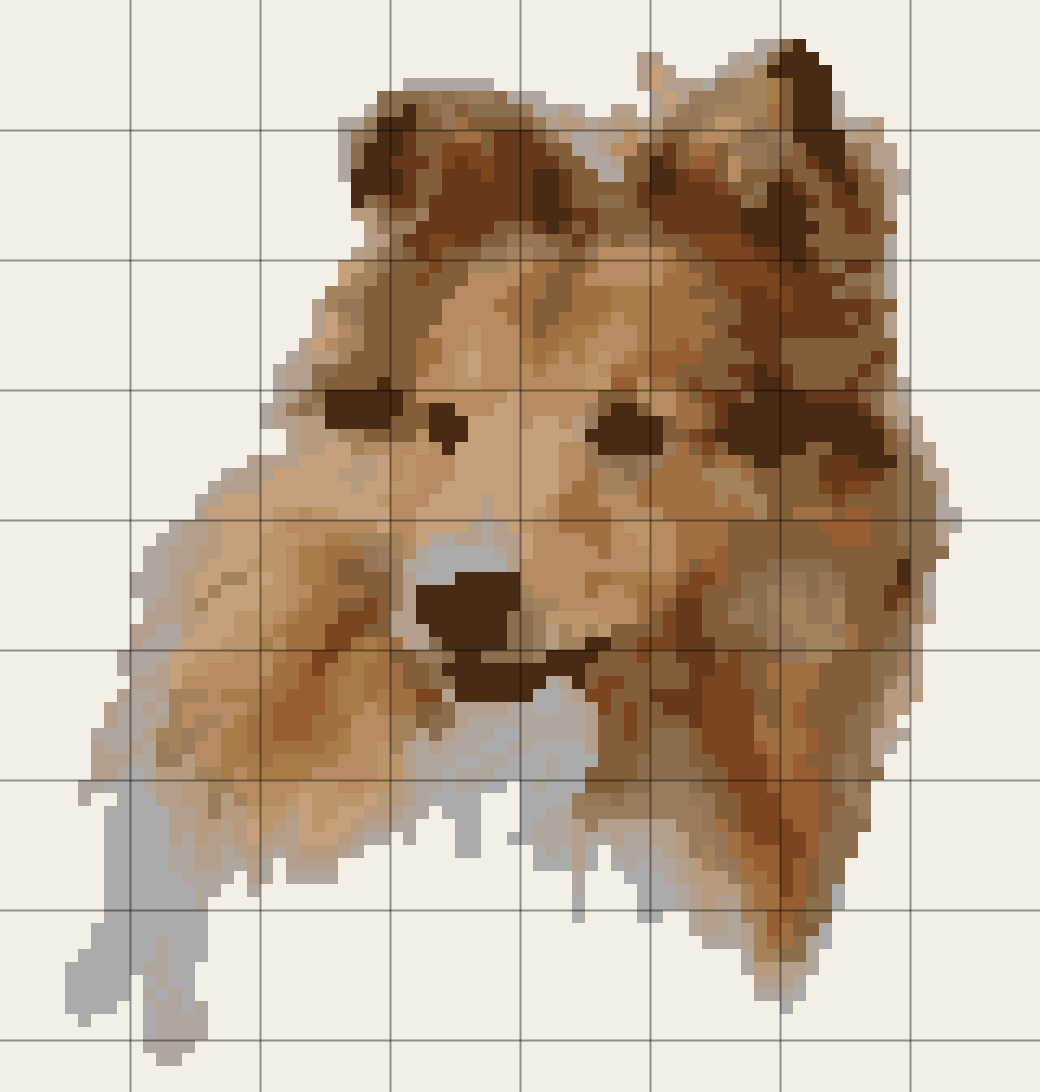
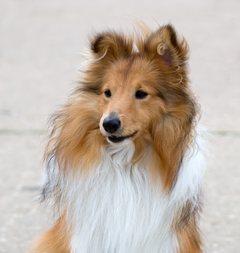
- Choose a photo. A sheltie sample photo is already loaded, so the result is on screen before you start.
- Crop tightly to the face or subject with the zoom and position sliders.
- Pick the fabric and the width in stitches. The finished size in inches and centimetres updates as you type.
- Keep “Leave the background unstitched” on for pets and portraits, and lower the tolerance if it bites into the subject.
- Leave confetti clean-up on, set the number of DMC colors, then download the PDF chart.
Fabric count and DMC thread, in DMC's own words
| Question | What DMC says | Source |
|---|---|---|
| What “count” means | “The count refers to the number of stitches you can make in an inch.” “The metric equivalent is pts/cm - stitches per centimetre.” | DMC, “Aïda” product page |
| Bigger or smaller? | “The higher the count the smaller stitches you will make.” | DMC, “What Fabric Should You Use for Cross Stitch?” |
| Which count to start on | “We recommend beginners use 14-count/5.5pts which is the most popular aïda in our range.” | DMC, “Aïda” product page |
| Linen and evenweave | “Working “over two” means making a cross stitch over two warp and two weft threads.” | DMC, “What Fabric Should You Use for Cross Stitch?” |
| How many floss colors | “Available in 500 vibrant shades.” (product page) · “504 Colors” (range page) · “With this color card you can preview 485 solid, and 18 variegated, DMC Six-strand Embroidery Floss colors.” | DMC, Six-Strand Embroidery Floss (Mouliné Spécial); DMC, Embroidery Floss range; DMC, threaded color card |
| Skein size | “Sold in 8.7 yard/8 meter skeins, its six strands separate easily.” | DMC, Six-Strand Embroidery Floss (Mouliné Spécial) |
All read on dmc.com on October 24, 2026. Gridloom is not affiliated with DMC. DMC is a trademark of its owner.
How big will my pattern be?
Divide the stitches by the count. That's the whole formula, because a 14-count fabric takes 14 stitches per inch. Linen worked over two takes half its thread count, so 28-count linen over two stitches like 14-count Aida, and 32 over two like 16. The table uses a landscape photo cropped to 4:3, so the height is three quarters of the width.
| Width in stitches | 11-count | 14-count (or 28 over two) | 16-count (or 32 over two) | 18-count |
|---|---|---|---|---|
| 60 (small pet face) | 5.5 × 4.1 in | 4.3 × 3.2 in | 3.8 × 2.8 in | 3.3 × 2.5 in |
| 80 (this page's sample) | 7.3 × 5.5 in | 5.7 × 4.3 in | 5.0 × 3.8 in | 4.4 × 3.3 in |
| 100 (largest free size) | 9.1 × 6.8 in | 7.1 × 5.4 in | 6.2 × 4.7 in | 5.6 × 4.2 in |
| 150 | 13.6 × 10.2 in | 10.7 × 8.0 in | 9.4 × 7.0 in | 8.3 × 6.2 in |
| 200 | 18.2 × 13.6 in | 14.3 × 10.7 in | 12.5 × 9.4 in | 11.1 × 8.3 in |
Add spare fabric around the design for the hoop and for framing. The tool adds 3 inches on every side by default; that's our habit, not a DMC rule, so change it to suit your frame.
Why most photos make messy patterns, and what this tool does about it
The background eats the stitch count. In a typical pet photo, half of the squares are lawn, sofa or blur. Stitch them and you spend weeks on the least interesting part. Tick “Leave the background unstitched” and the tool looks at the colors along the top, left and right edges, then removes everything joined to those edges that is close to one of them, so that part of the chart is left as bare fabric. On the sample, the grey backdrop behind the sheltie becomes bare fabric and the head stays. If it eats into your subject, lower the tolerance. If your subject doesn't reach the bottom of the frame, untick “Subject touches the bottom edge” so the bottom edge counts as background too.
Confetti. A photo has a different shade in nearly every pixel, so a straight conversion scatters lone stitches of one color among another. Each one means starting and ending a thread for a single cross. The clean-up switches any stitch with no same-colored neighbour (including diagonals) to the most common color around it, two passes over the grid. The status line shows the count before and after, so you can see what it did. It does soften fine detail like whiskers and catchlights in the eyes, so compare with it off.
Too many colors. More colors isn't more realism once each one covers only a handful of squares. We start photos at 18 DMC colors. Go up for faces with soft skin tones, down for bold, graphic results.
Light fur on a light background. The sheltie's white ruff is nearly the same color as the grey behind it, so at a high tolerance it goes with the background. That's why the sample is cropped to the head and set to a tolerance of 12. If part of your subject vanishes, lower the tolerance, crop it away, or untick background removal and stitch the background in a single color instead.
Dark fur and shadows. Very dark areas collapse into two or three near-black browns and lose their shape. A photo taken in daylight, with light on the face, gives the chart more to work with than any slider can.
How many DMC colors are there, and which can this tool use?
DMC's own pages give three different numbers on October 24, 2026: “Available in 500 vibrant shades” on the floss product page, “504 Colors” on the range page, and 485 solid plus 18 variegated on the threaded color card. This tool matches your photo against 453 DMC numbers with approximate RGB values from the open-source CrossStitchCreator project. (That list has 454; we leave out DMC 309 because its stored value is a grey-brown that doesn't fit its name, Rose Dark.) It doesn't cover all of DMC's current range: 24 of the 100 numbers in DMC's own Top 100 pack (1–9, 13, 16, 19–23, 27–30, 32, 33, 35 and 83) aren't in it, so the tool never picks those. Every color in the key is labelled with its DMC number, but screens and printers can't show thread exactly, so check against a physical color card when a shade matters, like a pet's eye color.
Is DMC's own photo service free?
Only if you buy the thread from DMC. Its “Stitch Your Photo” pattern is described like this: “Turn your photos into cross stitch patterns. Simply upload a photo, select your preferences: size, filter, stitch count and number of colors.” The page showed a price of $10.99 when we read it on October 24, 2026. Its code also has an option labelled “Pattern PDF (FREE) + all required thread”, with the note “*when you buy all thread required.” The page also says “Please note that we cannot edit or alter your photo.” and “Stitch charts can be customized to stitch on 14, 16 or 18 count Aida or 28 or 32 count linen, in a range of sizes.” (DMC, “Stitch Your Photo”). This page does the same kind of conversion free up to 100 stitches wide, in your browser, and lets you crop and clear the background yourself before the chart is made. DMC's service emails a chart and lists thread quantities; this tool lists stitch counts per color instead.
What this tool doesn't do
No backstitch outlines, half stitches or blended threads: every square is one full cross in one DMC color. No skein estimate either. DMC sells 8.7-yard skeins of six strands, but how far one goes depends on how many strands you use, the fabric and your tension, and none of the DMC pages we read gives a stitches-per-skein figure, so we'd only be guessing. The key gives the exact stitch count per color, which is what you need to make your own estimate. It doesn't remove backgrounds that don't touch the edges, such as a wall between two people. For flat artwork, logos or pixel art rather than photos, the general cross-stitch pattern maker is simpler, and the Perler bead pattern maker does the same job for fuse beads.
Frequently asked questions
Can you turn a photo into a cross stitch pattern?
Yes. Load the photo above, crop it to the subject, choose the fabric count and the width in stitches, and the tool turns every square into the nearest of up to 40 DMC colors. You get a preview, a color key with DMC numbers and stitch counts, and a printable PDF chart with a symbol in every square.
Is this photo to cross stitch pattern maker free?
Yes, for patterns up to 100 stitches wide, including the PDF chart, the DMC key, background removal and confetti clean-up. No signup and no watermark. Gridloom Pro ($5 for 30 days or $36 a year, paid in USDC) unlocks patterns up to 600 stitches wide.
How do I convert a photo to a cross stitch pattern free online as a PDF?
Choose your photo, crop it, set the fabric and width, then press Download PDF chart. The PDF has an overview page, chart pages with bold lines every 10 squares and row and column numbers, and a color key with DMC numbers. It's made in your browser, so the photo is never uploaded.
How many stitches wide should a photo pattern be?
There's no official number. As a starting point we use about 60 stitches for a pet's face and 80 to 120 for a person, where the eyes need more squares to stay clear. Divide by the fabric count for inches: 80 stitches is about 5.7 inches on 14-count and 4.4 inches on 18-count.
What fabric count is best for a photo cross stitch?
DMC recommends 14-count Aida for beginners: “We recommend beginners use 14-count/5.5pts which is the most popular aïda in our range.” Higher counts make the same chart smaller and finer, which suits detailed photos if you're comfortable with small stitches.
How many stitches per inch is 14 count Aida?
14. DMC defines count as “the number of stitches you can make in an inch”, and gives 14-count as 5.5 stitches per centimetre (“14-count/5.5pts”).
How much smaller is 18 count than 14 count?
The same chart comes out 14/18 of the size, about 22% smaller in each direction. 100 stitches is 7.1 inches wide on 14-count and 5.6 inches on 18-count.
What does 28 count over two mean?
On linen or evenweave, a cross stitch is worked over two threads each way. DMC: “Working “over two” means making a cross stitch over two warp and two weft threads.” So 28-count fabric over two gives 14 stitches per inch, the same size as 14-count Aida. Pick “28-count linen, over two” in the fabric menu.
How many DMC thread colors are there?
DMC's own pages say “Available in 500 vibrant shades” (floss product page), “504 Colors” (range page) and 485 solid plus 18 variegated (threaded color card), all read October 24, 2026. This tool chooses from 453 of them.
How do I make a cross stitch pattern of my dog?
Use a sharp, well-lit photo with the dog's face filling most of the frame. Crop to the head, keep “Leave the background unstitched” on so the lawn or sofa becomes bare fabric, use 60 to 100 stitches across, and compare the eyes with confetti clean-up on and off, since lone highlight stitches are often what make a pet look alive.
What is confetti in cross stitch?
Single stitches of one color surrounded by other colors. Photos create lots of them, and each means starting and finishing a thread for one cross. This tool's clean-up replaces any stitch with no same-colored neighbour, and shows how many were left before and after.
Does it work on a phone, or do I need an app?
No app needed. It runs in the browser on phones, tablets and computers, and the photo stays on your device. On a phone, the PDF downloads to your files so you can print it later.